
➦ INTRODUCTION TO PYTHON
In this Lecture I am going to teach you about basic introduction of
Python. so let’s start -- All the
earlier languages like C, PASCAL, FORTRAN etc. are based on functional aspects
of Programming. i.e. writing program through Functions.
But programmers faced a lot of difficulties in functional programming. Then
computer scientist thought to develop a new way of programming in which we can
do programming by linking with real life examples which can makes programming
easier. Thus, they developed a new concept of programming called object oriented programming in which programming were done by using
objects and classes. After that JAVA (and other languages also) Java came in the market and it becomes the world most popular language. Java is a pure object oriented
programming language. So, if we write any statements, at first we need to
define class (due to object orientation) and this become a demerits of Java language. object
which do not have any requirement of defining any class also need to define
class and this makes program lengthy.
For example—When we write a simple program
to add two numbers, we write the program in java as:-
   public static void main(String[] args) {

      int num1 = 5, num2 = 15, sum;
      sum = num1 + num2;

      System.out.println("Sum of these numbers: "+sum);
   }
}
And the same program in Python like that :-
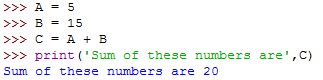
Here, we can easily finds that Java programming is lengthy in comparison to Python.
Programmers wants a
language which contains the features of both (Procedure and object oriented)
languages so, they can do Programming as per requirement and there dreams came
as true in 1991.

PYTHON
Python was developed by Guido van Rossum in 1991. The name of this language 'Python' was
taken from a T.V. show named 'Monty python flying circus '. Actually, Python
were created at the beginning of 1990 but it was publically announced in
20 February 1991.
➥ Today, Python is one of the most popular language of the
World. This is because of his some excellent features :--
i) Simple/Easy to learn = Python is very simple language. By reading
his syntax and code we feel like we are reading English alphabets. We can
learn its syntax and code very easily.
ii) Open source = Python is free software and can be download from its
official website (WWW. Python.org). It also provide their source code and
anyone can modifies and can do changes in there source code to use
themselves according to there need.
iii) High
Level Language = Languages
are of two types:-
a) Low Level Language
-- In this language programming were done through machine codes (0 and 1).
Assembly language and Machine language are two Low level Languages.
b) High Level Language --
In this language programming were done through English alphabets. some examples of high level languages are C,Python, COBOL etc.
iv) Platform
Independent = Programs (applications)
that created from Python language can be executed or can be use in any O.S.
like LINUX, UNIX, Windows,Macintosh, etc.
v) Portable = When a program yields the same result on any computer in the
world then it is called Portable. Programs developed from Python are
Portable.
vi) Procedure and Object Oriented = In Python we can do
Object Oriented Programming as well as Procedural (functional) Oriented
Programming.

What is Object Oriented Programming ??
That programming in which we use the concept of objects and
classes are called Object Oriented Programming. Now let's move towards objects
and classes. All the things in the universe which are physically exist are
called object. Let's take an example, There is a boy named Shyam. So, Shyam
exist physically in our house, thus Shyam is an object. Now, Shyam have some
properties like their height, weight, color etc. these properties are
called attributes and it is represented by variables in Python. Shyam can do
various actions like laughing, weeping, talking etc. these actions are
represented by methods in Python. So, an objects have their own attributes and
methods.
Now, we are going to explain about classes. Classes are the things which
do not exist physically come back to example we saw . There is a boy named
Shyam. Here, Boy don't exist physically. so, Boy is a class. we can take
another example for more clarity. Suppose a dog named Snoopy will be a object
and dog is class we can also say snoopy is a object of dog class.
remember that class also have there own attributes and methods.

Execution of Python Program :-
The code which we write in Python are called Source Code. When we compile a source code then
Python compiler convert it into Byte Code.
Byte code represents a fixed set of instruction that represent all the
operations. size of byte code is just 1 byte (8 bits), after that PVM(Python Virtual Machine) interpreter convert the byte code
into machine code (0 and 1). Then the processor (C.P.U.) process the machine
code and give their output.
Note:- Extension of Python Source code is .py.
Extension of Python Compiled file is .pyc.
Language Translator:-
A language translator is a software which translates the programs from high-level language to low-level language.
➠There are Two types of Translator:-
a) Compiler = That translator which converts the whole program into other form of language in one go.
b) Interperature = That translator which converts the program line by line into other form of language.
Frozen Binaries :-
The way through which we can provide an applications to the end user are called Frozen Binaries.
➠There are two way to provide the applications that were made from
Python to the end user.:-
➢By providing them byte code and they will install P.V.M and can
use the application by interpreting the byte code. Second method is
to provide them .pyc file , P.V.M and required libraries of python. so, they
can use all these to make single (.exe) file and can start to use it in Just a
click But .exe file are greater in size in comparison of .pyc file(Byte code).
##**---------------------**##
Comments
Post a Comment